What Is a Dieline? Meaning, Templates and Box Examples
A dieline (also written die line) is the flat outline of a box before it is cut and folded. In packaging and printing, it shows the exact size of every panel. Its lines mark where to cut, fold and glue. Your artwork sits on top of it, so the print lines up once the box is built.
Think of it as your box unfolded and laid flat on a table, drawn at real size. Every custom box, bag, pouch and label starts as a dieline. If it’s wrong, the box will be wrong, no matter how good the design looks on screen.
Below, you’ll learn what each line means and how the drawing becomes a real box. You’ll also see dielines for common box styles, where to get a template, and the mistakes that cause most reprints.
What is a dieline used for?
A dieline is used for three jobs. It tells the designer where artwork goes. It tells the factory how to build the cutting die. And it tells the folding and gluing machines how the flat sheet becomes a box. One accurate file keeps the design, the print and the finished structure in line with each other.
Without one, a printer can’t make a custom box. A picture of a box shows how it should look. Only the flat drawing shows how it is actually built.
What do the lines on a dieline mean?
A packaging dieline uses different line styles so nobody confuses a cut with a fold. Solid lines usually mean cut, and dashed lines usually mean fold. Colors change from printer to printer, so always check the key on your file. The meaning of each line stays the same.
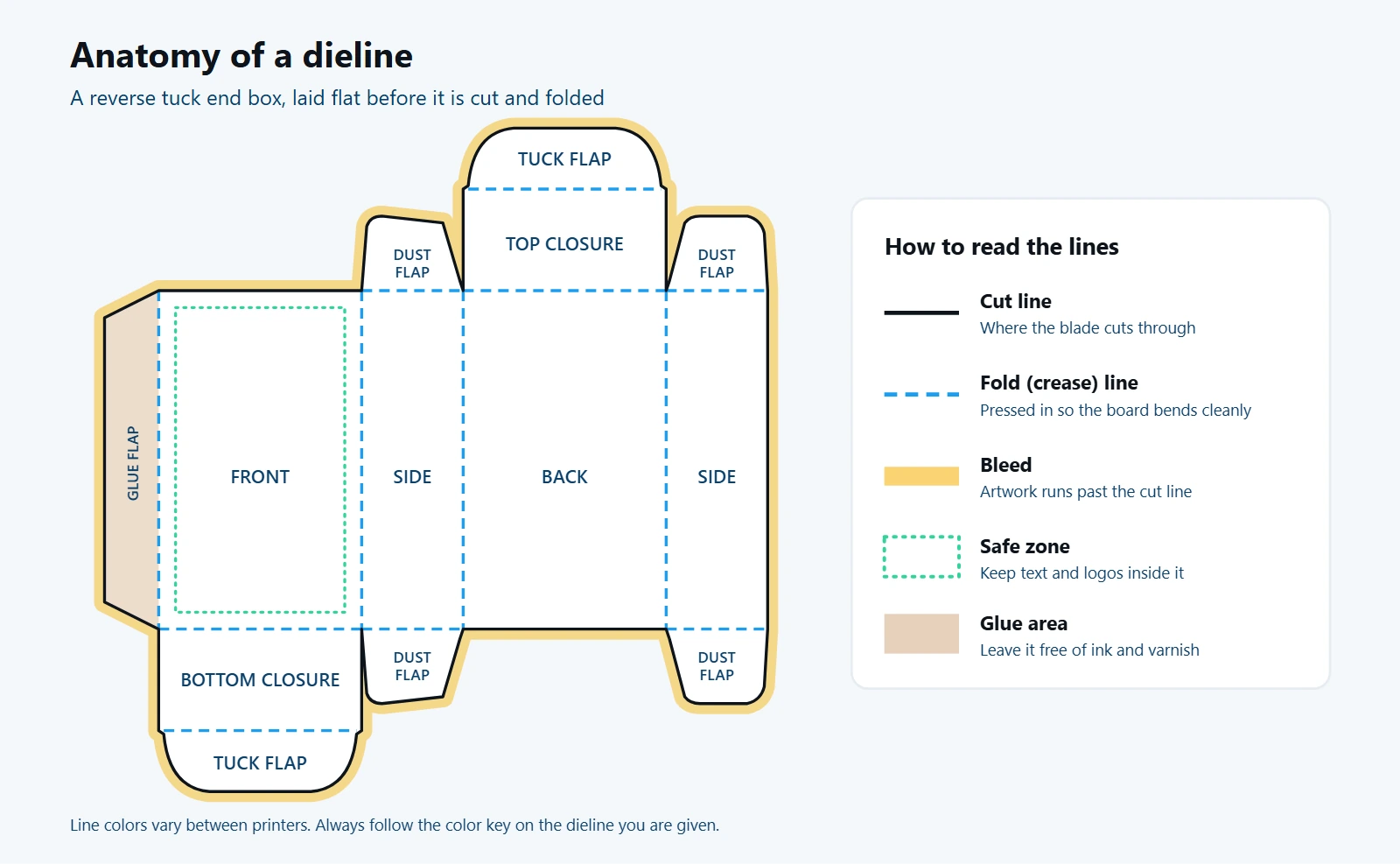
- Cut lines show where a blade cuts all the way through the board. This is the outside edge of your box.
- Fold lines (also called crease or score lines) show where the board is pressed in so it bends cleanly. They’re usually dashed.
- Perforation lines show a row of small cuts that tear open by hand, like the tear strip on some mailer boxes with a tear strip.
- Bleed is extra artwork that runs past the cut line. It’s trimmed off, but it stops a thin white edge from showing.
- Safe zone is a margin inside the cut line. Anything important, like your logo, text and barcode, stays inside it.
- Glue flap is the narrow strip that gets glued to hold the box together. Keep ink and varnish off it, or the glue may not stick.
| Line or area | What it does | What you should do |
|---|---|---|
| Cut line | Outer edge, cut through | Don’t move or redraw it |
| Fold line | Bends the board | Avoid tiny text right on the fold |
| Perforation | Tears open by hand | Keep key art away from it |
| Bleed | Hides small cutting shifts | Extend background art about 1/8 in (3 mm) past the cut |
| Safe zone | Protects important details | Keep text and logos about 1/8 in (3 mm) inside the cut |
| Glue flap | Holds the box together | Leave it free of ink and coatings |
Why is it called a dieline?
The word dieline comes from the die, the tool that cuts your box. A cutting die is a board with thin steel blades bent into the exact shape of your layout. Blunt steel rules press in the fold lines at the same time. So the dieline is the drawing the die is built from.
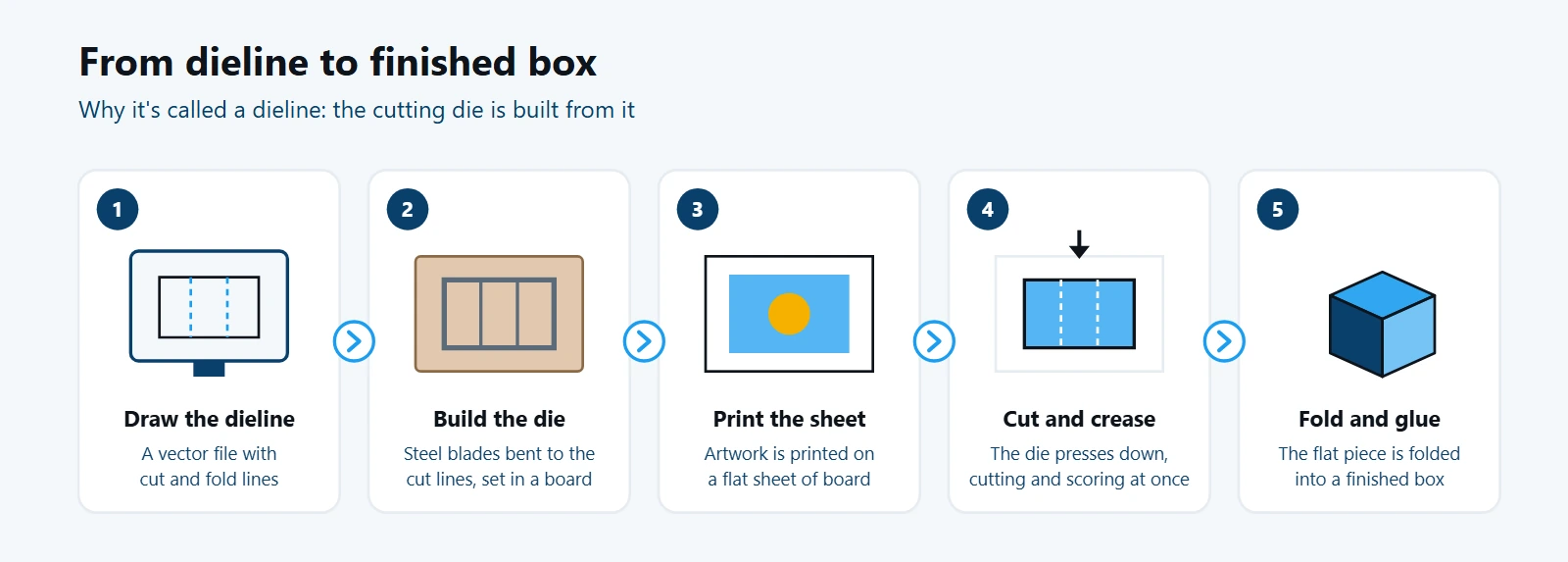
Here’s how it works in a factory:
- The outline is drawn as a vector file.
- A die is built from that file, with blades for every cut line.
- Your artwork is printed on a large flat sheet of board.
- The die presses down on the sheet. It cuts the outline and creases the folds in one stroke.
- The flat piece is folded, and glued if the style needs it.
So it isn’t just a design guide. It is the blueprint the cutting tool is made from. That’s why the size has to be exact.
You may also see the word “dyeline.” That’s a different thing: an old method for copying technical drawings. In packaging, the right word is dieline.
Dieline vs die cut vs keyline vs mockup: what’s the difference?
These four words get mixed up a lot. A dieline is the flat technical drawing. A die cut is the cut made by the steel die, or the shape it produces. A keyline is an older printing term for an outline that marks where art goes. A mockup is a picture of the finished, folded box.
| Term | What it is | Who uses it |
|---|---|---|
| Dieline | Flat drawing of cut, fold and glue lines at real size | Designers and printers |
| Die cut | The cut made by the steel die, or the custom shape it creates | Factories |
| Keyline | Outline that shows where art or a window sits, often not cut | Printers, older term |
| Mockup | 2D or 3D image of the finished box, for approval | Brands and designers |
In short, you design on the dieline, approve the mockup, and the factory makes the die cut.
What does a box dieline look like?
A box dieline looks like a flat, unfolded box. The panels join edge to edge, with flaps on the ends. Every box style has its own layout, because the panels, flaps and locks change with the shape. Here are three common ones, simplified so the shape is easy to see.
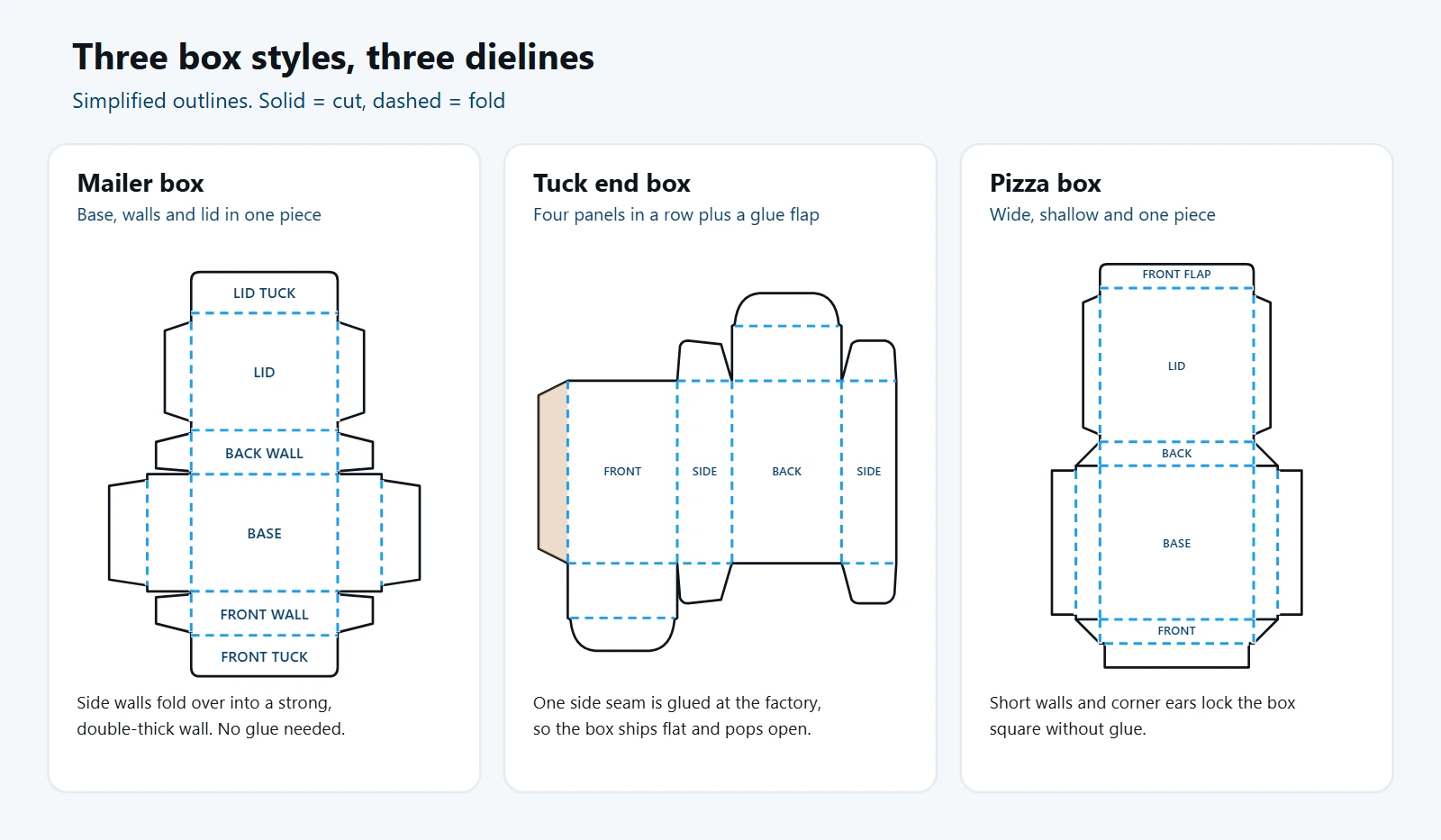
Mailer box. The base sits in the middle, with the walls and lid around it. The side walls fold over into a double-thick wall, and the lid tucks into the front. No glue is needed. This is the style behind most custom mailer boxes used for ecommerce and subscription orders.
Tuck end box. Four panels sit in a row (front, side, back, side) with a glue flap on the end. One seam is glued at the factory, so the box ships flat and pops open. Flaps at the top and bottom tuck in to close it. You’ll see this on cosmetics, supplements and small retail items. Common versions include the reverse tuck end box and the straight tuck end box. Browse more custom tuck boxes and folding cartons.
Pizza box. A wide, shallow box in one piece. The lid folds over from the back, and small corner “ears” lock the walls square without glue. A pizza box dieline is usually made for corrugated board, which is thicker than the paperboard used for tuck boxes. See our custom pizza boxes.
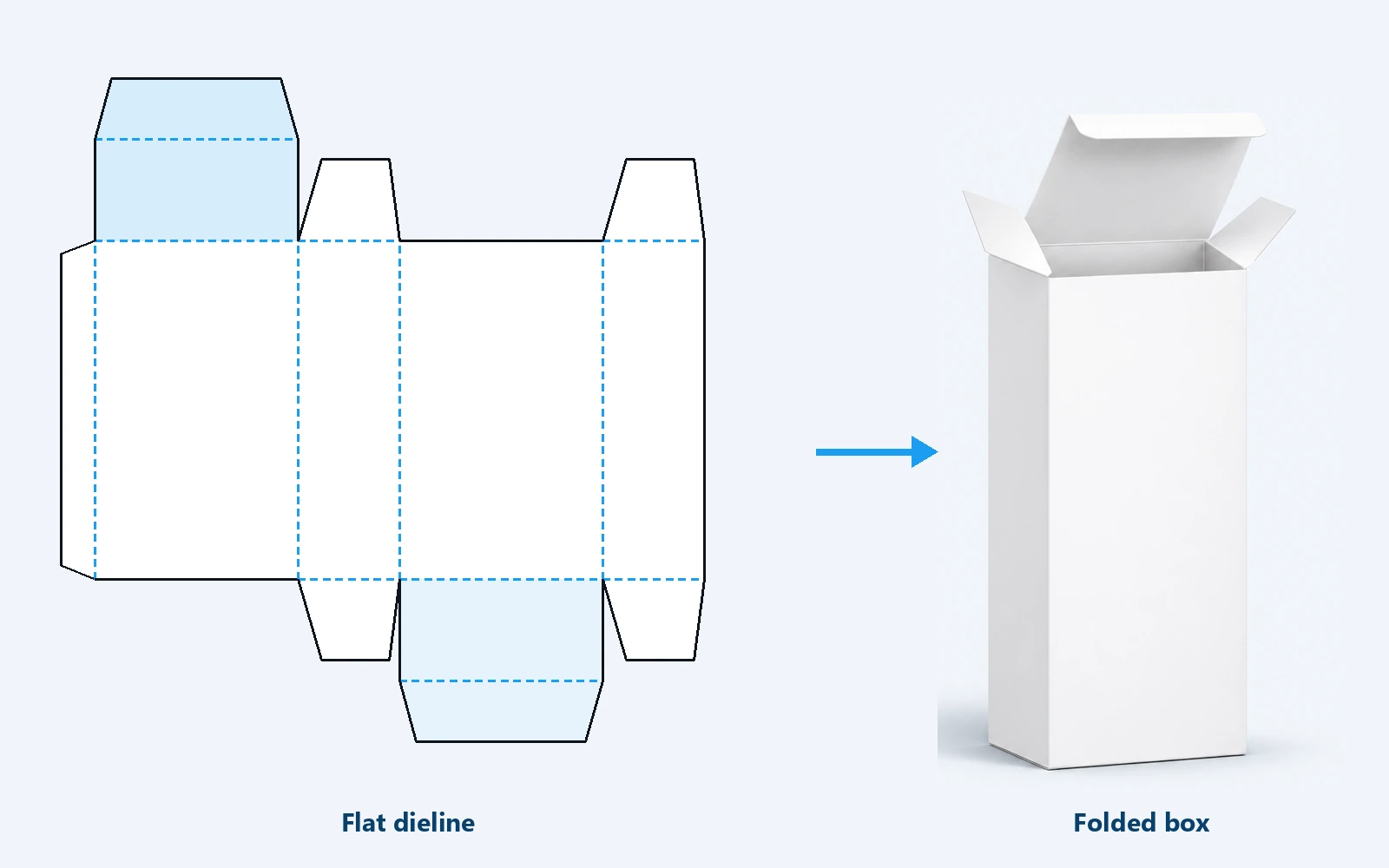
Cardboard box dieline. A layout for corrugated cardboard has to allow for the thickness of the board. Thick board takes up room at every fold. So the panels are drawn slightly larger than the inside size. That’s why a template for corrugated boxes can’t simply be reused for thin paperboard.
Rigid box. A rigid box is made of thick chipboard wrapped in printed paper. Its dieline is mostly for the wrap sheet. Extra margin folds over the edges and tucks inside the box. See our rigid boxes.
Want to see a real one? Our Crystal & Co mailer box story shows the actual dieline, with the outside and inside print laid over it.
Do bags, pouches and labels have dielines?
Yes. Bags, pouches and labels have dielines too. A pouch dieline shows the front and back panels and the seal areas. It also marks the zipper, the tear notch and any bottom gusset. A label dieline shows the label’s cut shape and its bleed and safe zone. It works just like the box version.
The big difference is the seals. On a pouch, the heat-sealed edges can’t carry key text, because the seal can squash or hide it. So the safe zone on a pouch is wider at the edges than on a box. Packlic makes custom mylar bags, die-cut mylar bags and labels and stickers. Each one starts from its own dieline.
How do you set up a dieline in Illustrator?
To set up a dieline in Illustrator, start from your printer’s file. Keep the lines on their own locked layer. Place your art on a layer below and run the background into the bleed. Keep text inside the safe zone. Most printers want a vector file in CMYK color mode, with photos at 300 dpi.
Most printers send the file as an Adobe Illustrator file (.ai) or a vector PDF. You place your artwork on it. If you’re doing it yourself, these steps cover the basics.
- Start from the printer’s file. Don’t redraw one from a photo or guess the sizes. Ask your printer for a dieline made for your exact box size and board.
- Put the dieline on its own layer. Name it “Dieline” and lock it. Put your artwork on a separate layer below it.
- Use a spot color for the lines. Many printers ask you to color the lines in a spot color named “Dieline” or “Cut” and set it to overprint. This keeps the lines from printing on your box.
- Set the color mode to CMYK. Screens use RGB, but presses print in CMYK. Converting early avoids color surprises.
- Use high-resolution images. Photos should be at least 300 dpi at full size, or they may print blurry.
- Extend your background into the bleed. Pull any color or image that touches the edge out past the cut line by about 1/8 inch (3 mm).
- Keep key details in the safe zone. Move text, logos and barcodes at least 1/8 inch (3 mm) inside the cut line, and away from folds.
- Check each panel’s direction. Some panels end up upside down once folded. Top flaps and back panels catch people out the most.
- Convert text to outlines before sending, or include the fonts, so nothing changes on the printer’s side.
- Export as the printer asks. That’s usually a print-ready PDF with the line layer kept separate.
Bigger factories design dielines in structural software such as ArtiosCAD. That software accounts for board thickness, which changes the size of each panel slightly. CAD files are often shared as DXF files, which Illustrator can open. This is another reason to use your printer’s dieline instead of a free template.
Where can you get a dieline template?
The best place to get a dieline template is your packaging manufacturer. They make it for your exact size, box style and board thickness, so it will fold correctly. Free templates and online generators are useful for practice and early mockups. Check any free file with your printer before you use it for production.
A dieline template is simply a ready-made layout for a standard box style. A dieline generator is an online tool that draws one when you type in a size. Both save time early on. But they can’t know the exact board your printer uses. So the panels may be off by a few millimeters.
What are the most common dieline mistakes?
Most packaging reprints come from a handful of simple file errors. The big ones are missing bleed, text near the edge, art on the glue flap and upside-down panels. Using the wrong template and printing the dieline itself are also common. Check for all of these before you approve a proof.
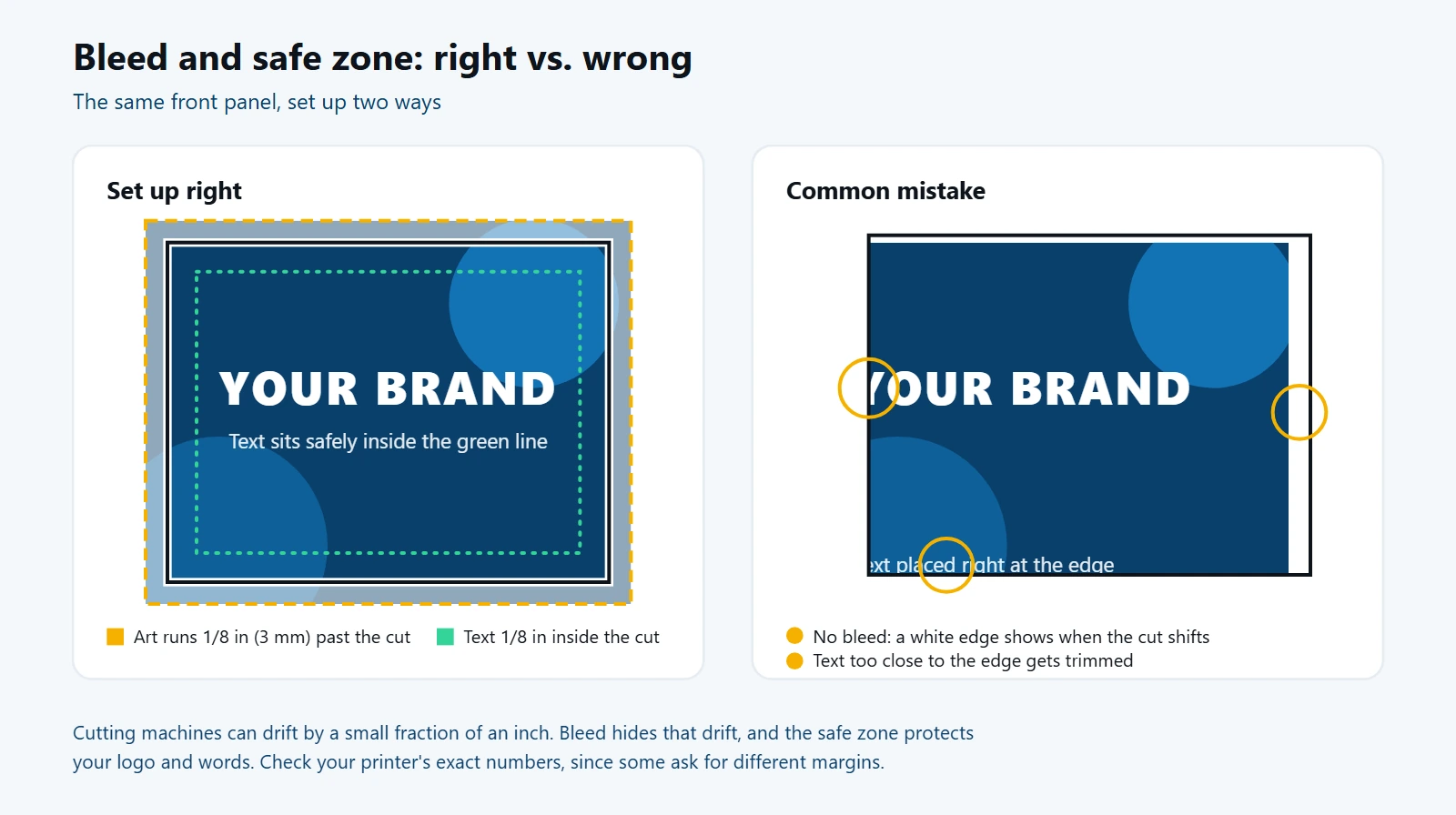
- No bleed. The cutting machine can shift by a tiny amount. If your art stops exactly at the cut line, a thin white edge can appear.
- Text too close to the edge. Words or logos outside the safe zone can get trimmed off or wrap around a fold.
- Art on the glue flap. Ink and varnish on the glue area can stop the glue from holding.
- Upside-down panels. Art that looks fine flat can end up upside down on the finished box. Print a copy, cut it out and fold it to check.
- Using the wrong dieline. A free template made for different board can be off by a few millimeters, and the box won’t close well.
- Printing the dieline. If the line layer isn’t set to non-printing, the lines end up on your box.
- Moving or editing the lines. Never resize the dieline to fit your art. Change the art to fit the lines instead.
Do I need to make my own dieline?
No, you don’t need to make your own dieline. For a custom box, your manufacturer should give you one. They make it to match your box size, style and the board it will be made from. Your job, or your designer’s job, is to place the artwork on it and check the proof.
At Packlic, our team engineers the exact cut, crease and fold for your box. You also get free design support and a 3D mockup in about an hour. Ask us for a dieline for your size, and your designer can start with the right file from day one.
A real example: Vicious Grooming came to us with an AI-made concept image of a beard oil box. It looked good, but it had no dieline, no bleed and no real measurements. We rebuilt it as a print-ready template at 5 × 2 × 2 inches, with bleed and safe zones. We also added a die-cut insert for the bottle. Read the Vicious Grooming beard oil box story.
Frequently asked questions
Is it dieline or dyeline?
In packaging, it’s “dieline,” named after the cutting die. “Dyeline” is an old copying method for technical drawings and has nothing to do with boxes.
Is dieline one word or two?
Both spellings are used. “Dieline” as one word is the most common in packaging today. “Die line” and “die-line” mean the same thing.
What is a dieline in printing?
In printing, a dieline is a vector outline on its own layer of the print file. It marks where the sheet will be cut and folded. It does not print on the final piece.
What file format is a dieline?
It is usually an Adobe Illustrator (.ai) file or a vector PDF. Structural CAD programs often export DXF files. Vector files keep the lines sharp and exact at any size.
How much bleed does a dieline need?
Most files need about 1/8 inch (3 mm) of bleed past the cut line. Some printers ask for more or less, so follow the notes on your file.
What is a dieline template?
A dieline template is a ready-made layout for a standard box style, such as a tuck end or mailer box. It’s handy for practice. For production, use a template from your manufacturer.
Can I use a free dieline generator?
A free dieline generator is fine for practice or early mockups. For production, use the file from your manufacturer, because it’s built for your exact size and board thickness.
Who makes the dieline, me or the printer?
Normally the printer or packaging manufacturer makes it. You or your designer add the artwork on top and approve the proof.
Is a dieline the same as a mockup?
No. A dieline is the flat technical outline of the box. A mockup is a picture of how the finished, folded box will look.
The bottom line
A dieline is the flat blueprint of your box, bag or label. Learn what each line means, keep your art inside the safe zone, run the background into the bleed, and always start from your manufacturer’s file. Do that, and your packaging will come out the way you designed it. When you’re ready, browse our custom mailer boxes or tuck boxes, and ask us for a dieline for your size.